 Print Progress
A little closer to done.
Your prints.
At a glance.
The progress, the temperatures, the time left. A small native app that keeps an eye on your 3D printers while you get on with everything else.
Free & open source · macOS 14+ · Apple silicon & Intel
Direct download v0.5.1. iPhone & iPad submitted to the App Store.

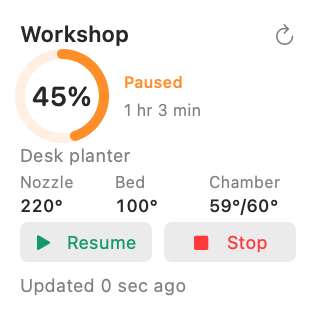 Actual widget · sample readings
Bambu Lab · Klipper · Creality · OctoPrint · PrusaLink · Duet · SDCP
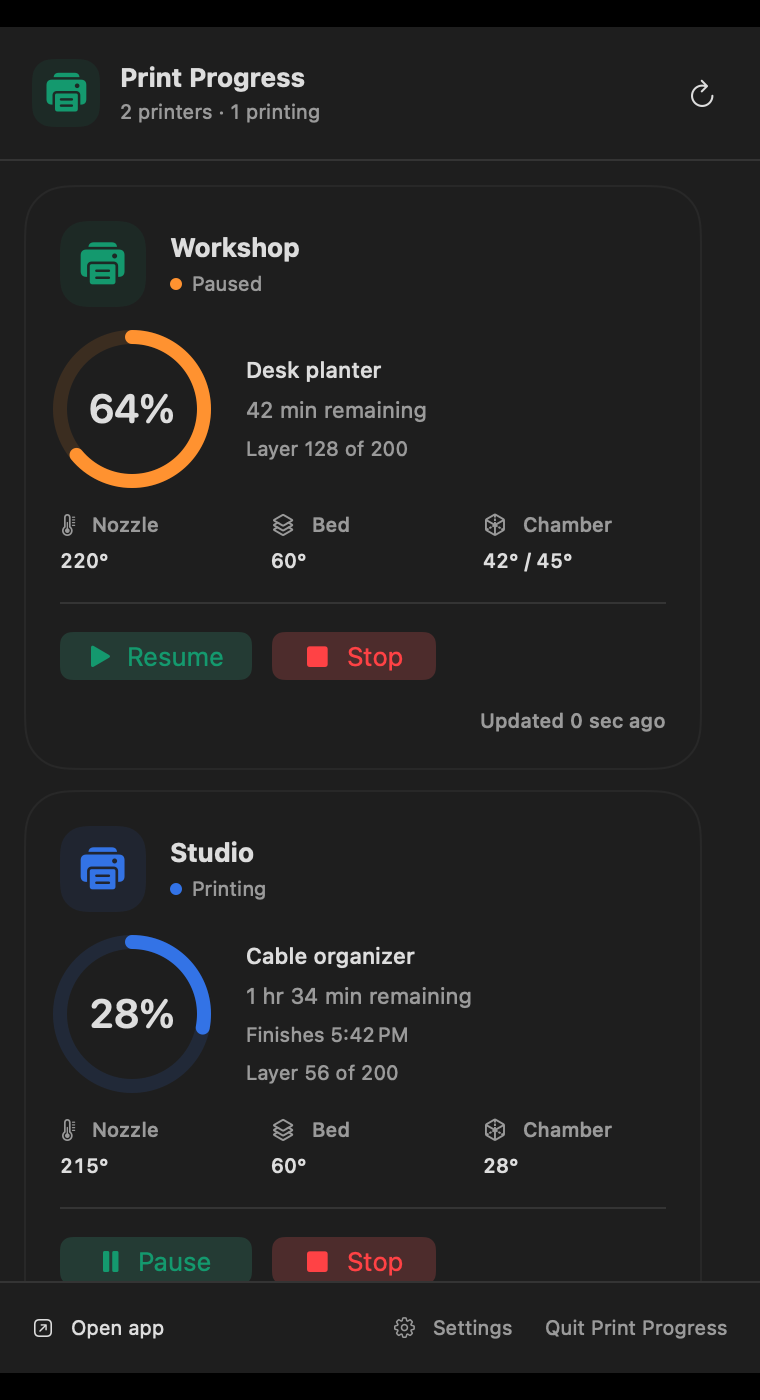
Actual app interface with fictional demo printers.
Small footprint. Full picture.
A tiny ring.
A lot less checking.
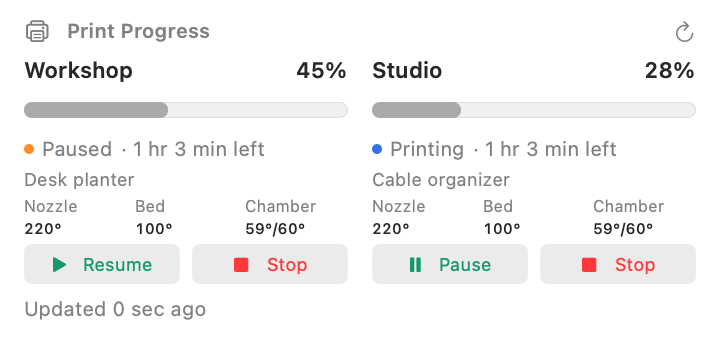
Keep a print in your menu bar. Click for the full picture across your printers. Close the app windows and the Dock icon slips away. Monitoring stays on.
Interactive preview · fixed sample progress
- 01 Nozzle, bed & chamber temperatures
- 02 Progress, layers & time remaining
- 03 Multiple printers, one dropdown
- 04 Pause, resume & confirmed stop
At your desk. On your Home Screen.
Less checking.
More making.
Add a widget to your Mac desktop, iPhone Home Screen, or iPhone Lock Screen. See the last reading and when it arrived, without opening your slicer.
Apple schedules widget updates. The app shows real readings and timestamps, so you can tell a fresh update from an older one.
Explore the widgetsFictional readings. iOS release pending App Store approval.
Your network.
Your printer data.
No account. No analytics. No cloud subscription. Credentials stay in your device’s Keychain. Monitoring connects directly to the printers you add.
Different printers. Same glance.
Bring your workshop.
Seven local connection families.
Choose the interface your printer exposes.
Bambu LabLocal MQTT / TLS
Including H2D. Connect with the printer’s address, serial number and LAN access code. No Bambu cloud login needed.
Klipper & MoonrakerHTTP / HTTPS
Voron, many Neptune setups, and other Klipper printers exposing Moonraker. Fluidd and Mainsail URLs work too. Enter an API key if your server requires one.
Creality K1 familyNative WebSocket
K1, K1 Max and K1C firmware with the local status service. No Moonraker installation is required for this connection.
OctoPrintHTTP / HTTPS
Many Marlin and Ender printers work through an existing OctoPrint host. Use the server URL and an API key with status permissions.
PrusaLinkModern & legacy APIs
Connect to a printer exposing PrusaLink using its local API key or Digest username and password. Prusa Connect cloud accounts are separate.
Duet & RepRapFirmwareDWC / DSF
Supports modern object-model queries, legacy status and Duet Software Framework REST. Add the machine password if one is configured.
SDCP v3WebSocket / UDP
Compatible networked resin printers, including some Elegoo Saturn and Mars models. Availability depends on model and firmware exposing SDCP v3.
Hardware checked with Bambu H2D and Creality K1 Max. Other connectors have automated protocol tests and still need broader physical-printer testing. Compatibility depends on firmware and the available interface. Missing sensors show a dash.
Three small steps.
Back to your print.
- 01
Drop it in Applications.
Open the DMG and drag Print Progress to Applications. Open the copied app; its installer disk ejects automatically.
- 02
Add your printer.
The walkthrough helps you choose a connection and find the details. Allow Local Network access when asked.
- 03
Make it your own.
Pick a menu bar look, add a widget, and get on with your day. Or explore the built-in demo first.
A few useful details.
Is it free?
The Mac download is free and the source is MIT licensed. You can inspect, modify and build it yourself.
Can it pause or stop a print?
Yes. Pause, resume, or confirm Stop to cancel the current job from the app or Mac menu bar. Desktop and Home Screen widgets also offer Pause/Resume; their Stop action opens a job-specific confirmation in the app. Lock Screen widgets show status only. Controls support Bambu LAN, Moonraker, OctoPrint, PrusaLink, native K1 and SDCP v3, subject to firmware and permissions. Duet currently supports monitoring only. Resume continues a paused job; the app does not start new files or offer motion, heater or camera controls.
How often does it update?
The running app checks about every 15 seconds. Apple schedules widget background refreshes and may delay them. The iPhone app stops polling in the background. There is no always-on cloud relay.
Does it work away from home?
Your device needs a network route to the printer, such as the same Wi-Fi or a secure VPN into your home network. A manufacturer’s cloud account alone is not enough.
Where’s the iPhone download?
The iPhone and iPad app has been submitted to the App Store. While approval is pending, the source is available to build with your own signing identity. This DMG is for Mac.